Download Two Accounts web Desktop Trail
Powerful desktop accounting software that works seamlessly with & without internet connection. Manage your finances anytime, anywhere.
Latest Release: Loading...
System Requirements
Server Configuration
- Processor: Intel Core i5 (recommended)
- RAM: 8GB minimum (16GB recommended)
- Disk Space: 20GB minimum
- OS: Linux (Ubuntu) 64-bit
Workstation Configuration
- Processor: Intel Pentium (2.93MHz) or better
- RAM: 2GB minimum (4GB recommended)
- Disk Space: 10GB minimum
- OS: Windows 7/10 or Linux (Ubuntu) 64-bit
Large Dataset Processing
- Processor: Intel Core i5 or better
- RAM: 16GB minimum
- Disk Space: 150GB SSD recommended
- OS: Windows 10 or Linux (Ubuntu) 64-bit
Minimum Configuration
- Processor: Intel Pentium Dual Core
- RAM: 512MB minimum (2GB recommended)
- Disk Space: 10GB minimum
- OS: Windows XP/7/8/10/11. Most modern Linux distributions with Python 3.11.4+
Browser Requirements
For optimal web-based usage: Google Chrome (latest version recommended)
Windows Installation
- Download the Windows version from above
- Extract the ZIP file to your preferred location
- Run
TwoAccountswebDesktopTrail.exe - For first login, use username: administrator and leave password blank
# To run from terminal:
cd /path/to/extracted/folder
.\TwoAccountswebDesktopTrail.exe
cd /path/to/extracted/folder
.\TwoAccountswebDesktopTrail.exe
Important Notes for Windows
- Run as Administrator if using Command Prompt/PowerShell
- If Windows Defender blocks the app:
- Allow through firewall when prompted
- Select "Private Networks" option
- If detected as malware by antivirus:
- Temporarily disable antivirus
- Or exclude the application folder
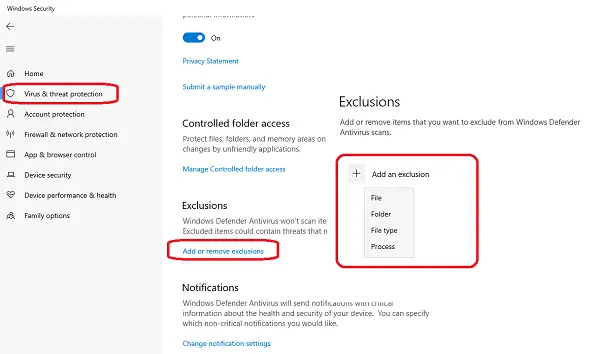
Windows Security - Add folder exclusion
Path: Start > Settings > Update & Security > Windows Security > Virus & threat protection
Linux Installation
- Download the Linux version from above
- Extract the ZIP file
- Make the file executable
- Run the application
- For first login, use username: administrator and leave password blank
# Extract and run:
unzip TwoAccountswebDesktopTrail-linux-x64.zip
cd TwoAccountswebDesktopTrail-linux-x64
chmod +x TwoAccountswebDesktopTrail
./TwoAccountswebDesktopTrail
unzip TwoAccountswebDesktopTrail-linux-x64.zip
cd TwoAccountswebDesktopTrail-linux-x64
chmod +x TwoAccountswebDesktopTrail
./TwoAccountswebDesktopTrail
Important Notes for Linux
- Update your system first:
sudo apt update && sudo apt upgrade
- Python 3.11.4 or later is required
- For GLIBC errors:
- Upgrade system GLIBC
- Or set LD_LIBRARY_PATH to specific version
Common Features & Notes
Printing
- Default paper size: A4
- Default margin: 0.18 inch
- For printing issues:
- Adjust margins as needed
- Use browser print option (click top-right browser button)
PDF Generation
- For Bangla text in PDF:
- Install Bangla fonts:
# Linux:
sudo apt install fonts-beng
# Windows (PowerShell):
Install-Language -Language bn-BD - Or manually install fonts from Microsoft's guide
- Install Bangla fonts:
- If PDF issues persist:
- Clear application/browser cache
- Use browser's PDF option
- Download latest wkhtmltopdf (recommended version 0.12.4)
Alternative Browser Mode
- Run the following instead of desktop version:
# Windows:
TwoAccountsWebLib.exe
# Linux:
./TwoAccountsWebLib - Then visit
http://localhost:8989in your browser - Recommended for low-end systems
Uninstallation
- To uninstall click uninstall button form desktop graphical user inteface.
- Or simply delete the application folder.
- For fresh installs, use a clean system (multiple instances not supported yet).